
One device, consistent routing choices
A browser, TV or other connected device can use IPv4 and IPv6 within the same session. Once its IPv6 route also points to OpenSurge, both kinds of connection can use the registered device’s rules and selected outbound. You can keep a device on its own exit or let it follow the gateway’s rules.
OpenSurge preserves the source MAC as IPv6 packets arrive and maps it to the registered device. This keeps policy attribution tied to the device as its IPv6 addresses change, and lets you inspect the resulting connections from the control plane.
Choose how devices join the IPv6 network
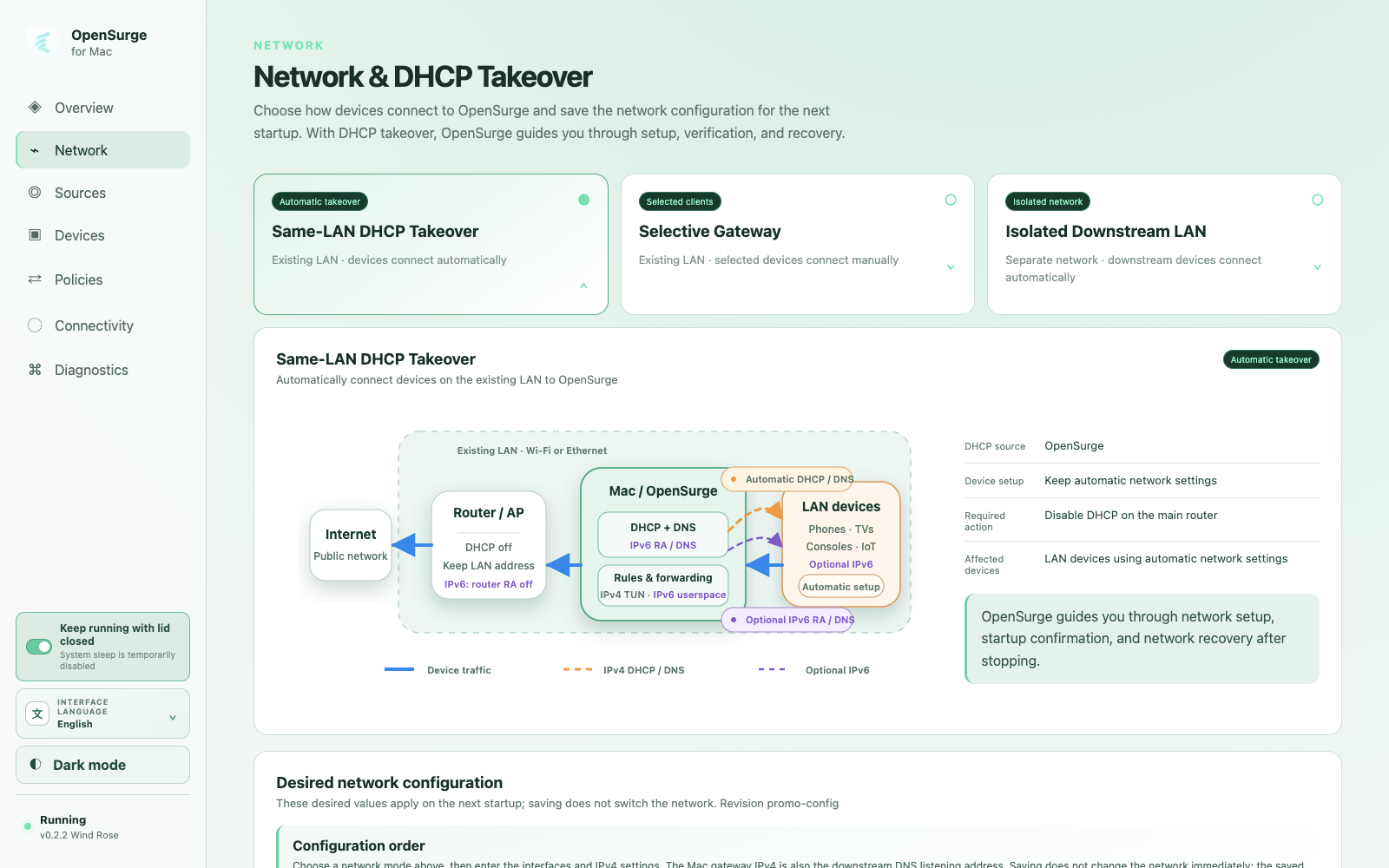
All three gateway topologies support experimental downstream IPv6 with transparent mode set to TUN. The topology determines how clients obtain their address, default route and DNS.
- Independent downstream LAN: OpenSurge advertises the IPv6 route and DNS on the separate downstream network. Clients use SLAAC to configure a local IPv6 address automatically.
- DHCP takeover on a shared LAN: clients also receive automatic IPv6 configuration. First disable the main router’s RA/DHCPv6 service, or use RA Guard to remove competing router advertisements, then confirm the shared-network prerequisites in OpenSurge.
- Bypass-router mode: manually configure selected clients with a ULA address and the Mac’s downstream link-local address as gateway and DNS. Use the Network page’s IPv6 quick reference, including the client interface scope where needed, and remove competing IPv6 default routes on those clients.
Set address resolution and traffic handling separately
The Downstream IPv6 card brings two settings together. AAAA responses let applications obtain IPv6 destinations from OpenSurge DNS; the takeover mode determines when the gateway establishes its IPv6 traffic path. Enable both for normal dual-stack use.
- Off: keep OpenSurge’s downstream IPv6 path disabled.
- Auto: enable the path when the selected upstream interface has a public IPv6 address and an IPv6 default route on that interface.
- Always: establish the downstream path even without native upstream IPv6. Use an appropriate proxy outbound to reach public IPv6 destinations in that setup.
- Automatic router advertisements apply to independent LAN and DHCP takeover. Bypass-router mode continues to use manual client settings in both Auto and Always.
Match the outbound to the application
Public IPv6 destinations can be reached through a proxy that supports them, even when the Mac’s upstream network only provides IPv4. Native DIRECT IPv6 needs a usable upstream IPv6 address and route. Choosing Always prepares the local path; the selected outbound supplies the onward connection.
The current forwarding path supports TCP and UDP. HTTP/3 and QUIC use UDP, so the selected proxy must also support UDP forwarding. ICMP forwarding is outside this path; check HTTPS and the application’s actual traffic instead of using ping as the sole connectivity test.
Start with one client and inspect its connections
On the Network page, confirm the downstream interface, topology, IPv6 mode and AAAA setting. After applying and starting the gateway, check one client’s IPv6 address, default route and DNS before opening an IPv6-capable service.
In OpenSurge’s connection view, check the device, IPv6 destination, matched rule and outbound chain. Then switch that device’s exit and create a new connection to confirm the change. Test UDP separately if your applications need it.
When an automatic IPv6 gateway stops, OpenSurge sends router advertisements with a zero router lifetime to withdraw its default route and removes its runtime network resources. In manual bypass mode, restore the client’s gateway and DNS when you stop using the Mac. The feature remains experimental; begin with a test device before extending it across your network.
FAQ
Questions people ask before changing the network
Do I need native IPv6 from my ISP?
For DIRECT public IPv6, yes. With Always enabled, an IPv6-capable proxy can provide the public connection over an IPv4 upstream. Its protocol support still needs to match the application.
Is enabling AAAA enough to take over IPv6?
AAAA controls DNS answers. Clients also need an IPv6 address, a route through the Mac and an active downstream IPv6 path. Configure these together in the Network page and on the client where manual setup is required.
Can I keep the main router’s IPv6 advertisements?
Automatic takeover on a shared LAN requires removing competing router advertisements and default routes. In bypass mode, arrange the selected client’s routes manually so its IPv6 traffic goes through the Mac.
What does the experimental label mean for daily use?
Behavior depends on the client, LAN topology, upstream and chosen outbound. Confirm the applications you use, device-policy changes and network recovery with a small setup before enabling the path for more devices.