
Keep the gateway on macOS
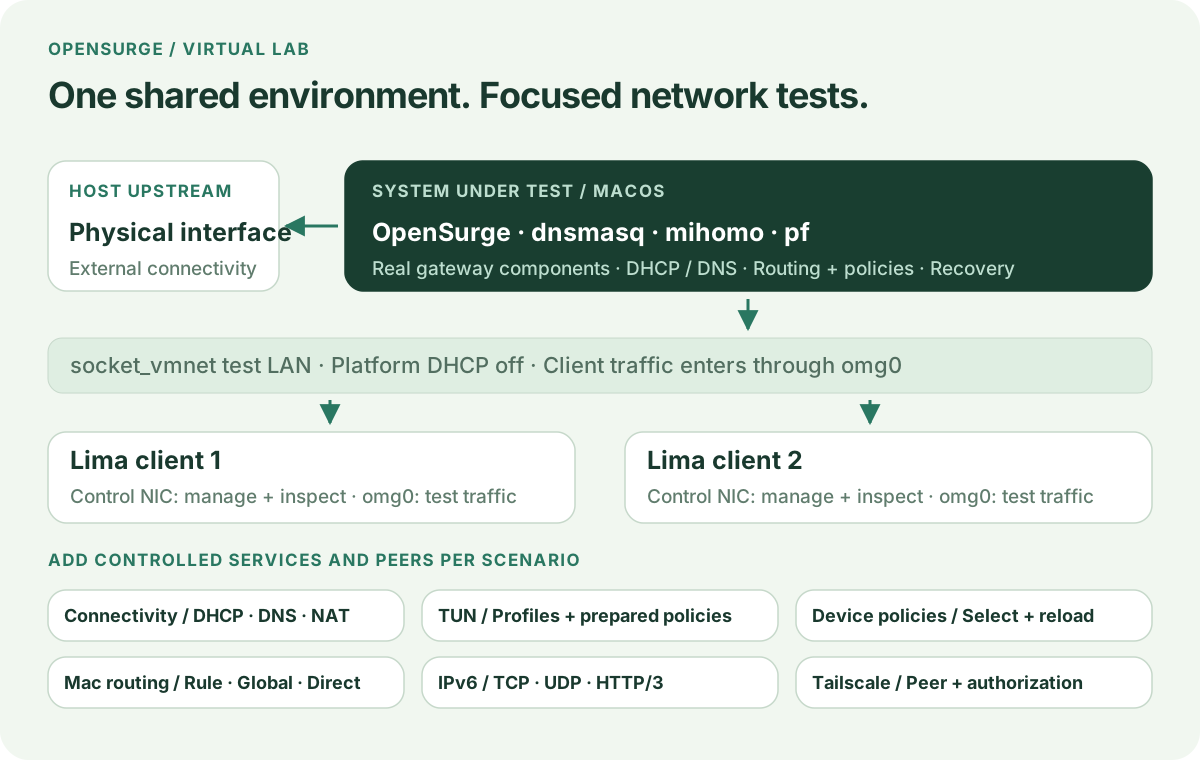
The gateway remains on the Mac, where OpenSurge manages dnsmasq, mihomo, pf, and forwarding. Two Lima Ubuntu VMs act as independent downstream devices. This arrangement exercises the operating-system components and network behavior that the product actually uses.
The clients connect through a socket_vmnet host network with platform DHCP disabled. OpenSurge’s dnsmasq supplies the test leases, so addressing, gateway selection, and DNS become part of the scenario. A shared environment can then support different routing and policy tests by changing the configuration and test services.
Separate management from test traffic
Each client has two interfaces. Lima’s built-in control interface handles provisioning and inspection; the second interface, omg0, carries the traffic being tested. The clients remain manageable while OpenSurge changes their test network.
Controlled services make route choices observable. Depending on the scenario, the lab adds an HTTP provider, a CONNECT proxy, TCP/UDP or HTTP/3 services, a SOCKS5 UDP outlet, or a Tailnet peer. These services give the runner a known response and a place to inspect incoming requests.
The controlled CONNECT proxy binds its upstream DNS and TCP connections to the physical upstream interface. This keeps the proxy’s own traffic from re-entering the TUN path it is helping to test.
Start with connectivity, then exercise transparent routing
The base scenario follows the client’s path into the network: obtain a lease, inspect the default route and DNS, resolve a name, and send traffic through the Mac. Separate requests exercise ICMP/NAT, direct HTTPS, and explicit HTTPS proxying through mihomo’s mixed port.
The TUN scenario keeps the clients free of explicit proxy settings. It sends HTTPS through the configured gateway and looks for the matching client traffic in mihomo’s log. Checking both the response and the observed route connects application behavior to the transparent path.
DNS and direct connectivity need distinct probes. When gateway DNS intentionally returns a fake IP, the direct NAT probe resolves a real public address separately and pins the HTTPS request to it. That avoids making one assertion depend on a different routing mode.
Follow configuration into live traffic
Imported-profile scenarios load a known profile, then add a controlled HTTP provider and CONNECT proxy. The runner switches the selected outlet between DIRECT and the proxy, sends fresh traffic, and checks which service received the request. This connects configuration composition and policy selection to the resulting egress.
The policy-workspace scenario begins while the gateway is stopped. It previews the composed policies, selects a node, and starts through the candidate-start path shared with the App. The scenario checks that preview does not overwrite the desired configuration or base recovery records, and that the selected policy carries into the running gateway.
- Imported profile: exercise the generated configuration with the actual proxy core.
- Controlled egress: make a policy switch observable in client traffic and the proxy service.
- Prepared workspace: follow preview and selection through startup, process handover, and cleanup.
Give device isolation its own scenarios
Two downstream clients let the lab assign independent identities and policies. DHCP reservations tie each client to a stable address. Scenarios compare a device following the gateway rules with one using dedicated policies, then change selections and reload the gateway.
The Mac-local routing scenario varies the Mac’s Rule, Global, and Direct modes while the clients keep their own policies. The device scenario also opens a persistent connection from each client, refreshes one device’s connections after a selection change, and checks that the other device’s connection remains in place.
Negative cases are part of the design. Device-specific rules must reject the intended request. A UDP request assigned to an HTTP-only outlet must be rejected at that policy boundary, preventing it from falling through to a general DIRECT rule.
Model IPv6 according to the topology
Experimental downstream IPv6 has scenarios for isolated LAN, whole-LAN DHCP takeover, and selective same-LAN routing. Automatic scenarios exercise RA, SLAAC, and RDNSS; selective onboarding uses manual ULA addressing and the Mac’s link-local gateway without advertising RA.
These scenarios exercise the macOS BPF broker and the patched mihomo userspace packet path, including device identity and policy selection. Controlled TCP and UDP services provide request-response probes. An HTTP/3-only client exercises QUIC and HTTP/3 without a TCP or HTTP/2 fallback, including DIRECT and SOCKS5 UDP outlets.
Stopping the gateway is part of the IPv6 scenario: the runner checks route withdrawal and cleanup of gateway addresses, broker processes, sockets, and runtime state. Separate imported-egress scenarios can add an explicitly supplied profile and native IPv6 upstream when the environment provides them.
Add Tailscale as a focused extension
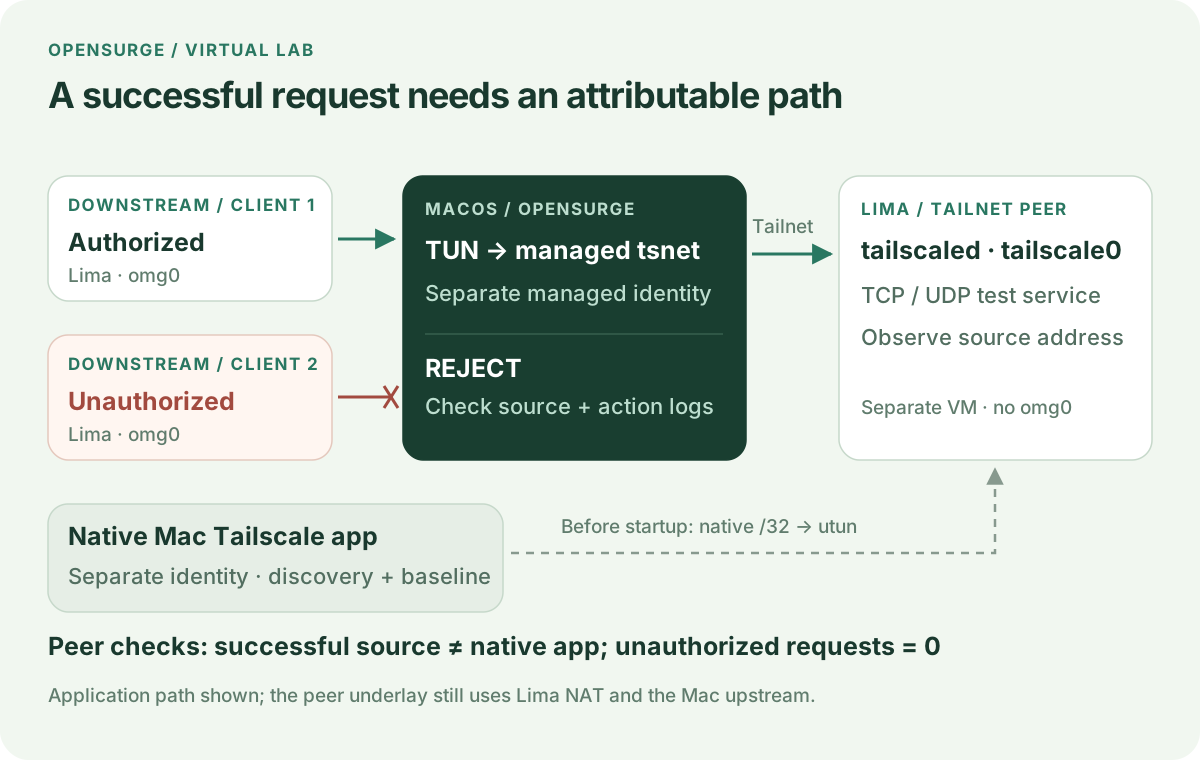
The Tailscale scenario extends the shared lab with a third persistent Lima VM. This peer runs its own tailscaled and a TCP/UDP service bound to tailscale0, and stays off the downstream omg0 network. OpenSurge’s managed tsnet node, the peer, and the Mac’s native Tailscale app have separate identities.
One downstream client is authorized and the other is denied. The runner sends TCP and UDP requests to the exact peer IPv4, plus TCP requests using the complete MagicDNS name. It checks the responses, the corresponding managed-outbound or REJECT actions, and the requests observed at the peer.
The native Mac app supplies discovery and an observable native peer route before startup. Successful requests at the peer must share a source different from that native identity, while unauthorized requests must never reach the service. This guards against a false positive through the Mac’s existing Tailscale route. The peer’s Internet underlay still uses Lima NAT and the Mac upstream; the test rejects an active native Mac Exit Node.
Design for repeat runs and recovery
The lab installer pins dependencies and verifies downloads. Ordinary stops preserve Lima disks, so later runs reuse the clients. Provisioning restores the guest control DNS before the gateway is running and skips package installation when the required tools are already available.
Each scenario has a teardown path. The runner restores control DNS, stops the gateway and auxiliary services, and checks the relevant runtime cleanup. The lab-down command stops the VMs and isolated host network. This makes recovery part of the test lifecycle.
Scenarios that use profiles or Tailnet credentials also control how sensitive inputs are handled. Protected files supply secrets, reusable node state avoids repeated registration, and sanitized outputs support inspection without copying credentials into test artifacts.
Choose scenarios by the behavior that changes
The shared environment gives contributors a practical way to map a change to a test. A DHCP or lifecycle change starts with the base network scenario; a routing change follows the relevant TUN or policy scenario; IPv6 and Tailscale use their own network extensions.
The repository’s validation map links these behaviors to their commands and assertions. Alongside the Agent Wiki and structured CLI diagnostics, it gives human and AI contributors a consistent path from understanding a change to exercising it.
FAQ
Questions people ask before changing the network
What is virtual in Virtual Lab?
The downstream devices are Lima virtual machines and their test LAN uses socket_vmnet. OpenSurge and the gateway’s macOS network components run on the host Mac.
Why use two downstream clients?
Two clients can have different identities, policies, and active connections. They let a scenario check that changing one device’s route or authorization leaves the other device’s behavior independent.
How is Tailscale related to the rest of the lab?
It is one focused scenario. It reuses the macOS gateway and downstream clients, adds an independent Tailnet peer, and checks private-target access, source authorization, and native-route bypasses.
How do contributors choose which tests to run?
The validation map associates changes with scenarios for connectivity, TUN, configuration, device policies, Mac-local routing, IPv6, and Tailscale. Contributors select the scenarios that exercise the behavior they changed.