
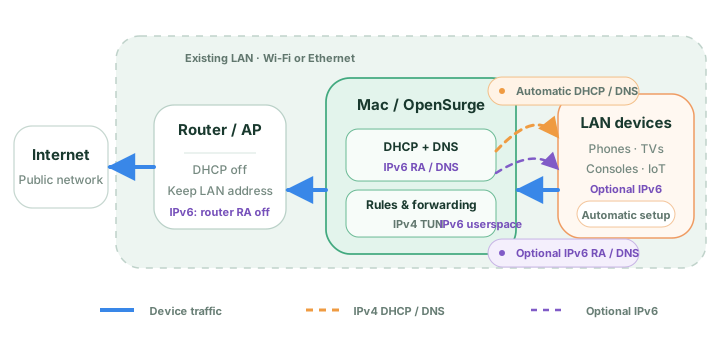
Prepare the offline recovery path first
In Network Settings, choose Same-LAN DHCP takeover, review the auto-filled interface, real subnet prefix, Mac gateway IPv4, upstream router/DNS, protected addresses, and DHCP pool, then save the configuration. Select Save network snapshot and offline recovery card before disabling anything on the router.
Follow the guided step that moves the Mac to the recorded fixed IPv4 and wait for OpenSurge to read the service back successfully. Keep the recovery card somewhere you can open without working LAN DNS; it records the router address and the manual settings needed to regain access.
Start, then prove DHCP, DNS, and TUN separately
Disable the main router's DHCP server only when prompted, return to OpenSurge, and run the DHCP OFFER probe. Continue after the expected state is confirmed, start OpenSurge, then disconnect and reconnect the test client so it requests a fresh lease.
A lease alone proves only that a DHCP server answered. Check that the client received the intended address, uses the Mac as IPv4 default gateway and DNS, resolves a fresh name, reaches HTTPS without an explicit proxy, and leaves the expected client/TUN and outbound evidence in OpenSurge.
- Lease: the address belongs to the configured pool or reservation.
- Gateway and DNS: both point to the Mac's configured IPv4 for this topology.
- Data plane: fresh DNS and HTTPS succeed without configuring a client proxy.
- Attribution: the connection view shows the client and the outbound chain actually used.
Stop through the recovery state machine
Complete client validation, or explicitly record that it was skipped, before selecting Stop OpenSurge. Re-enable router DHCP when prompted, return to OpenSurge, run the DHCP OFFER probe, then restore automatic DHCP on the Mac or explicitly finish while keeping its static IPv4.
Do not equate a stopped gateway with a restored LAN, and do not quit while recovery remains pending. If you abandon takeover after the Mac became static but before the gateway became active, use Abandon DHCP takeover: OpenSurge returns the Mac to automatic DHCP only when an offer is visible; otherwise it can finish in an explicit keep-static state without claiming that automatic client recovery succeeded.
FAQ
Questions people ask before changing the network
Does receiving an OpenSurge DHCP lease prove takeover works?
No. It proves the lease step. Gateway, DNS, proxy-free HTTPS, TUN observation, and the intended outbound still need separate evidence from the client.
Can I quit after the gateway says stopped?
Not while recovery is pending. Restore router DHCP, confirm an offer, and finish the Mac automatic-DHCP or explicit keep-static branch first.
Should a first-time user choose DHCP takeover?
Usually start with same-LAN manual gateway for one device. Choose DHCP takeover when automatic LAN onboarding is worth the wider operational impact and the router recovery path is understood.