
Build a configuration without importing a subscription
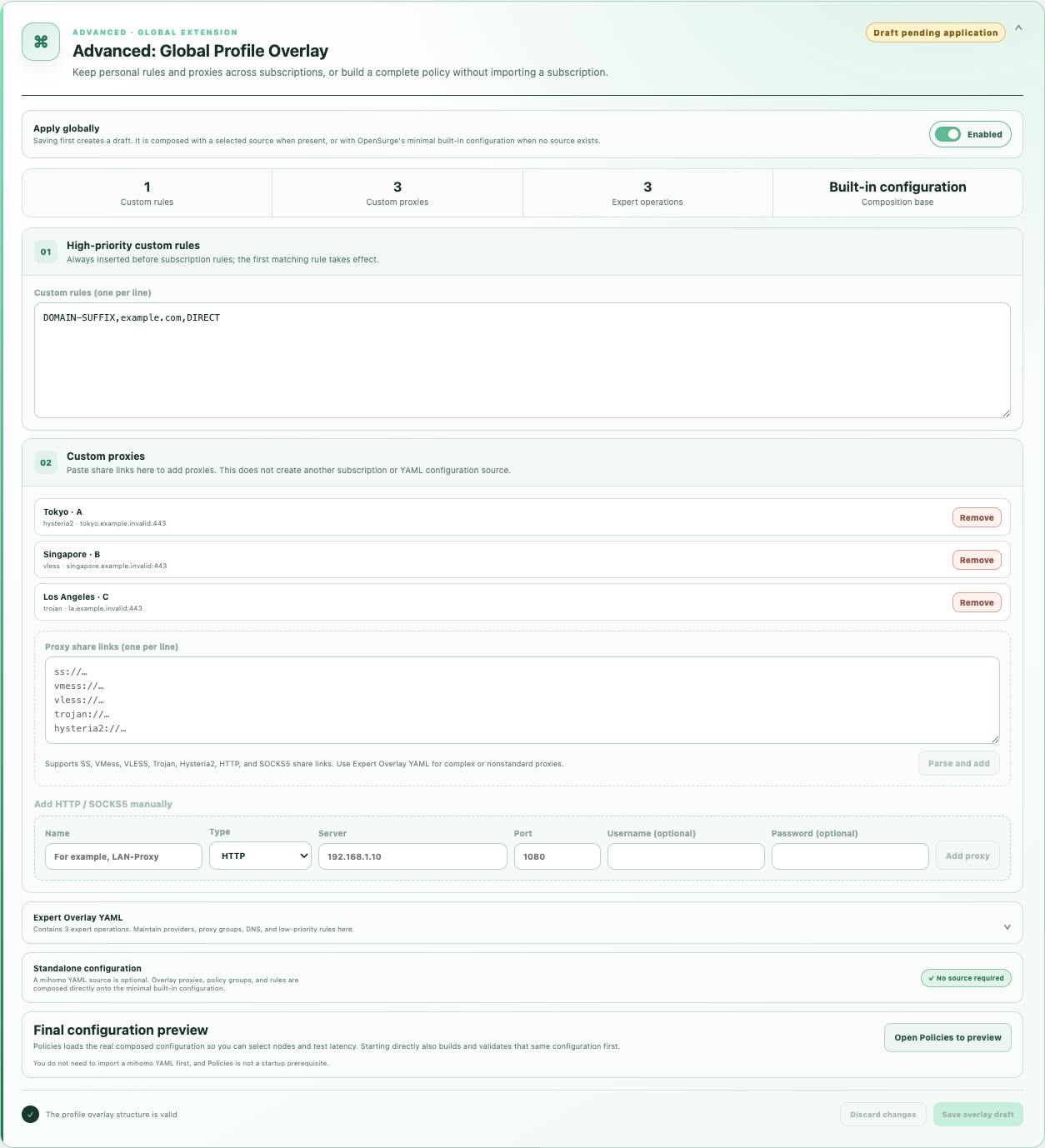
Open Sources and expand Advanced: Global Profile Overlay (Global Extension). Add a node by pasting a supported share link, or enter an HTTP / SOCKS5 server, port and optional credentials in the guided form. Use Expert Overlay YAML for manual policy groups, providers, DNS policy or other supported operations.
With no selected or applied source, OpenSurge composes your extension with its built-in minimal configuration. With an imported source, the same extension adds your personal nodes and rules to that source. Importing a subscription is optional.
Save the extension draft before previewing or starting it. Saving a draft does not change traffic on a running gateway.
Preview, select and test before starting the gateway
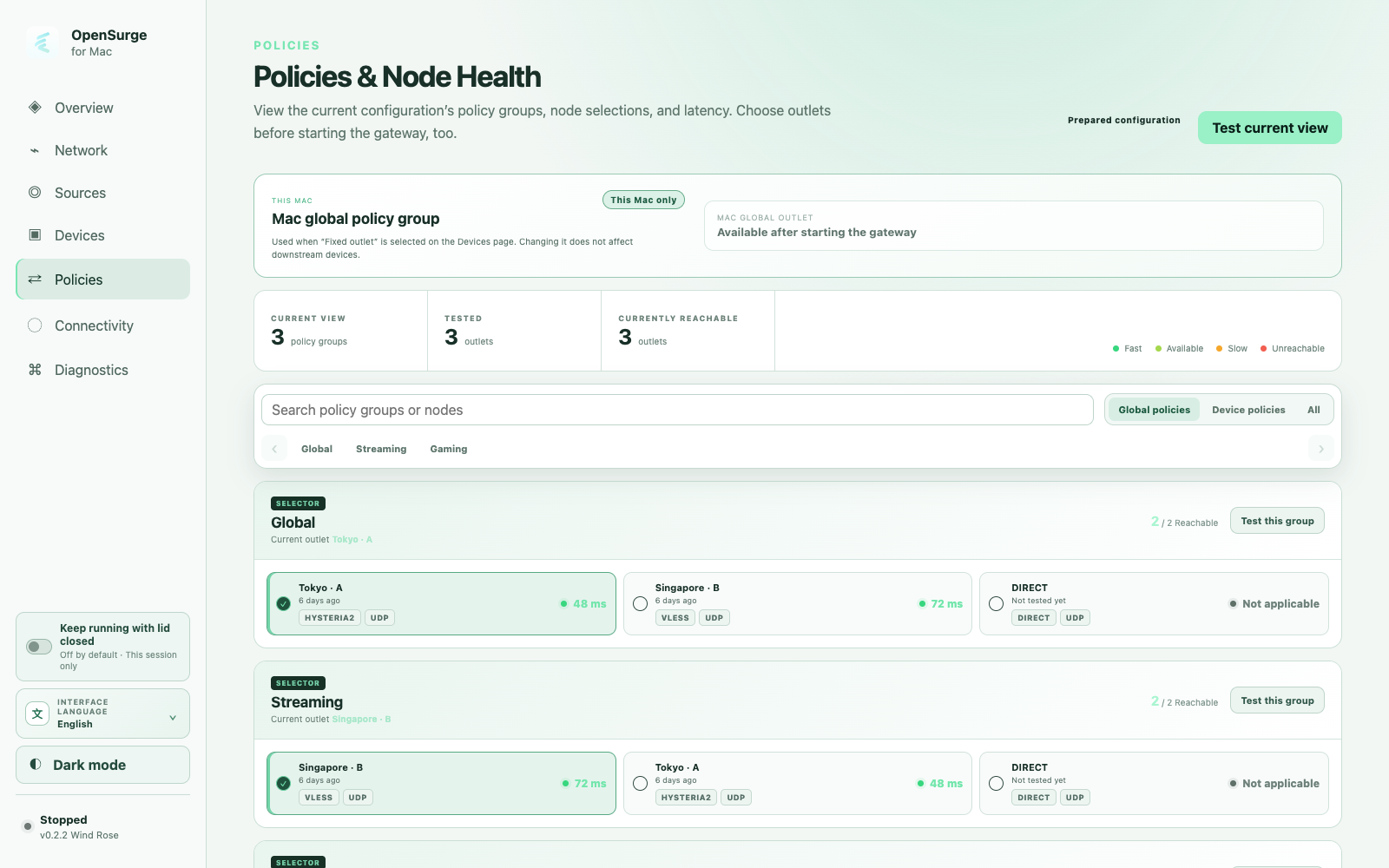
While the gateway is stopped, open Policies to inspect the composed groups, select nodes and test latency. A preparation core handles this view without taking over TUN, DHCP/DNS, packet filtering or forwarding.
You can also start directly from the Web GUI without visiting Policies first. OpenSurge composes and validates the candidate configuration before saving and starting that same configuration. The preview itself does not commit the desired gateway configuration.
For a running imported source, use its apply action to validate and reload the draft. After startup, verify an actual downstream connection separately: a preview or latency result is not end-to-end gateway evidence.
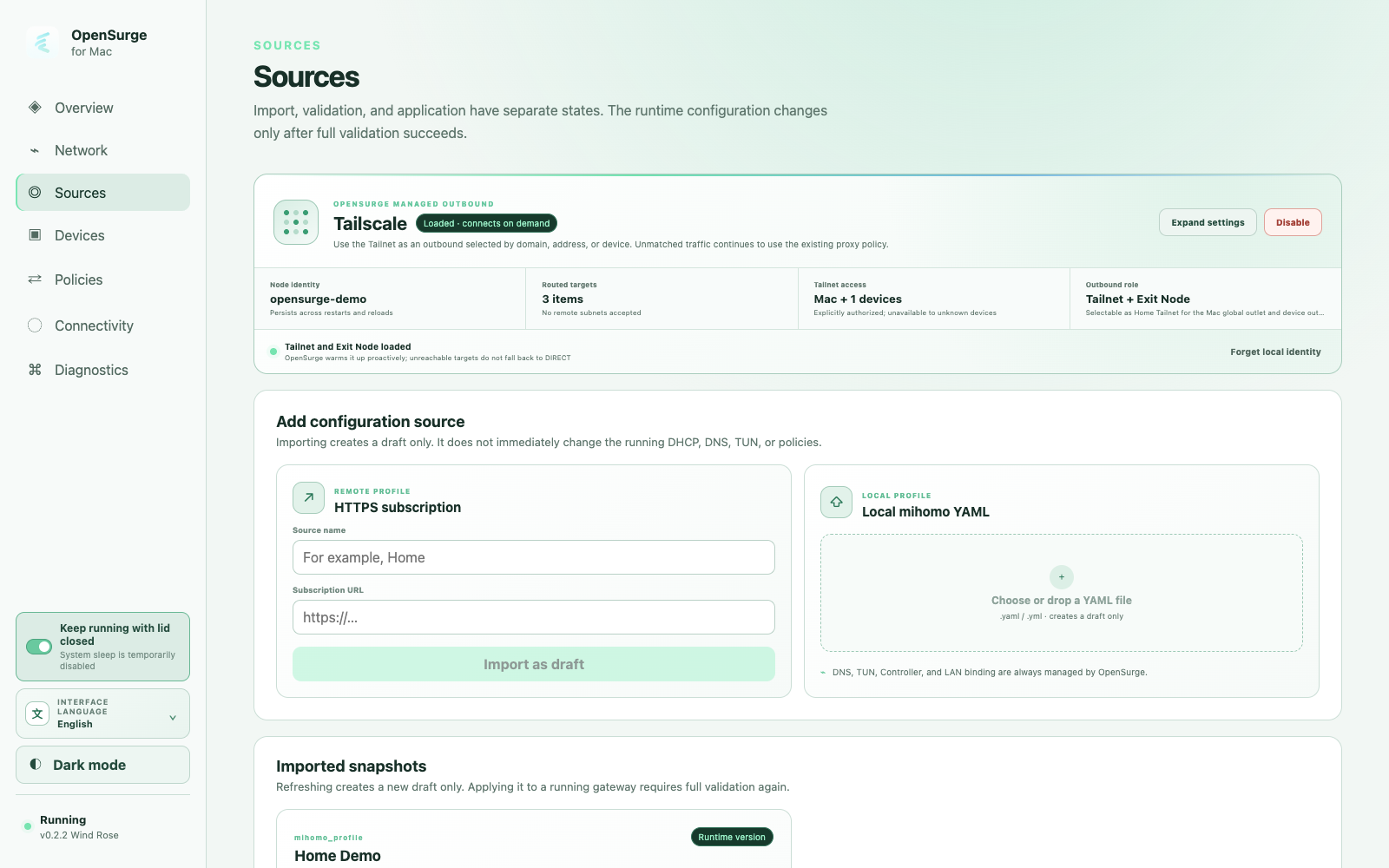
Import as a draft before changing the running gateway
In Sources, add an HTTPS subscription or local mihomo YAML and choose Import as draft. Structural validation must pass before the source can be selected for the next start or applied to a running gateway. A refresh creates another draft; it does not silently replace the applied version.
OpenSurge-managed snapshots carry digest, history, and apply state. Do not edit them in place. Use Export copy, edit the separate 0600 YAML under the exports directory, then import that file as a new local draft.
Know what the imported profile contributes
The imported profile contributes proxies, proxy-providers, proxy-groups, rule-providers, and rules. OpenSurge parses those sections as YAML nodes, so block and flow collections are supported, and it keeps rule order—including the requirement that no rules appear after a terminal MATCH.
The profile's DNS section is merged field by field. Resolver and filtering policy such as nameserver, nameserver-policy, proxy-server-nameserver, direct-nameserver, fake-ip-filter, and fallback settings can be retained because proxy hostnames may depend on them.
Know what OpenSurge continues to own
OpenSurge renders mixed-port, LAN binding, allow-lan, external-controller, selected-policy and fake-IP persistence, DNS enable/listen/fake-IP range, TUN routing, LAN exclusions, and runtime paths. Imported values cannot disable the gateway listener, replace its controller, or reintroduce unsupported transparent-proxy paths.
This boundary is why a desktop profile should be adapted as an imported source instead of copied over the generated runtime mihomo.yaml. The generated file is an applied artifact, not the editable source of truth.
proxies:
  - name: "LAN-SOCKS"
    type: socks5
    server: 192.168.1.23
    port: 1080
    udp: true

proxy-groups:
  - name: "Gateway"
    type: select
    proxies:
      - "LAN-SOCKS"
      - DIRECT

rules:
  - DOMAIN-SUFFIX,example.com,Gateway
  - MATCH,DIRECT

dns:
  nameserver:
    - https://1.1.1.1/dns-query
  fake-ip-filter:
- "*.lan"Apply transactionally, then inspect the real path
When the gateway is stopped, selecting a source updates desired state for the next start. When it is running, Apply and reload first validates the composed configuration, then performs a controlled gateway reload. A failed prevalidation leaves the current runtime untouched; OpenSurge records an imported-profile digest only after the new runtime starts successfully.
After application, inspect Policies and Providers, switch an applied Selector if needed, and generate new traffic. Node health and a valid YAML file are control-plane evidence; use Connections, matched rules, and an observed final egress to prove the traffic behavior you intended.
FAQ
Questions people ask before changing the network
Can I paste a complete desktop mihomo config over the runtime file?
No. Import it through Sources. The runtime file is generated, while OpenSurge must retain gateway-critical LAN, DNS, TUN, controller, and recovery ownership.
Will OpenSurge keep my proxy groups and rules?
Yes, when they are structurally valid and respect rule ordering and reserved OpenSurge namespaces. OpenSurge composes its local and device overlays around the imported sections.
Does a successful import prove the remote proxy works?
No. It proves the source can be composed. Test node health, generate a new business connection, and inspect the matched rule and actual outbound or exit separately.